SmallPDF’s privacy policy says it does not profile users. DevTools says it does.
One of the largest PDF editors on the web automatically classifies the contents of every document you upload and assigns you a user profile. Its privacy policy states, word for word, that it does not do this. Another editor sends telemetry to an endpoint literally named /noconsent. That observation, and three more from the same audit, can be reproduced in DevTools in about thirty seconds.
Scale: 247 million visits per month
When someone drops an invoice, a contract, or a passport scan into a browser-based PDF editor, they almost never stop to think about where that file goes. The service says it is “secure”, “encrypted”, “deleted after two hours”. Most users believe it and close the tab.
According to Ahrefs (snapshot taken 18 May 2026), the services covered in this article receive, combined, about 247 million visits per month from organic search alone. iLovePDF alone takes 178.9 million; SmallPDF, 56.1 million. And that is organic search only — actual traffic, once you add direct visits, newsletters, and paid acquisition, runs noticeably higher.
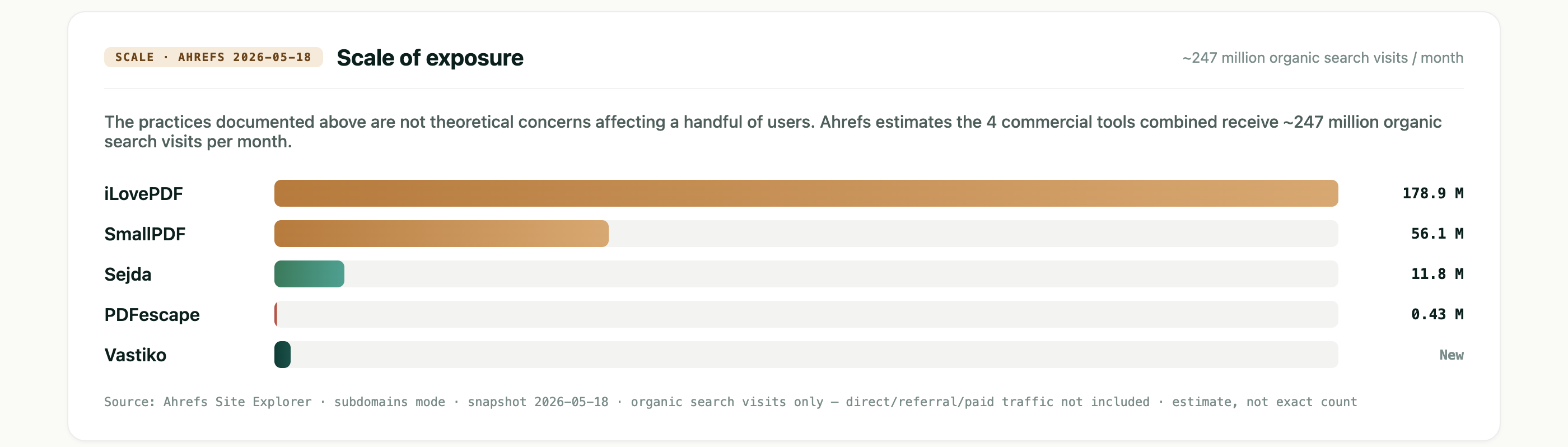
At that volume, even a small share of uploads carrying real documents — invoices, passports, medical forms, contracts with actual names and addresses — translates into millions of people every month. How these services behave technically is no longer an abstract concern. It is about specific documents belonging to specific people passing through servers whose behavior we describe below.
This piece is about what we saw in the browser, loading the same test PDFs into five online editors in sequence. No insiders, no leaks — only what the page itself sends to its servers. Any individual claim in the piece can be checked, in DevTools, in roughly thirty seconds.
What we did
We tested five services: Vastiko (the publisher of this audit — the conflict of interest is handled in a dedicated section below), iLovePDF, SmallPDF, Sejda, and PDFescape. The sample covers the largest anonymously-accessible browser PDF editors on the web. On each service we opened the Edit PDF page, uploaded the same synthetic test PDFs (an invoice template, an NDA, a mock passport page — all placeholder fields, no real personal data), and observed what the page sent to its servers. Other features (Compress, Convert, Sign, AI assistants) are not in scope here — their behavior may differ.
Captures were taken in Chrome 145 (macOS, incognito mode, no extensions) from a residential IP in Prague between 10 and 18 May 2026, in the anonymous, logged-out flow only. Each service received the same set of test PDFs in sequence; every finding reported below reproduced on at least two of them. Mobile browsers, authenticated paid flows, and non-EU vantage points are out of scope. Findings were reconfirmed within 48 hours of publication.
What we deliberately do not see
We see only what leaves the browser. What happens to the data once it lands on the services’ own servers — whether it is shared with a parent company (Bending Spoons owns both iLovePDF and SmallPDF), whether it is used to train models, whether it is sold downstream — is not visible from the browser. Those questions are collected in the “What remains unanswered” section near the end.
Three terms used throughout
Three terms come up repeatedly below. We define them once here so we do not break the flow later.
localStorage — a browser storage area where a site can write data that persists between visits. Unlike cookies, this area is not automatically attached to every request — but the site can read it and send the contents whenever it chooses.
JWT token — a short, signed string the browser presents to the server with every request, to prove it has authorization. A JWT carries a built-in timestamp marking when it was issued; some are valid for an hour, others have been in continuous use for years.
IAB TCF — the industry standard for maintaining the list of ad partners with whom a site shares user data. “140 TCF vendors” on a banner means the site shares data with 140 companies.
What we found
The five services fell into four distinct tiers, separated by architecture and by how they handle the user’s file. This is not a verdict on the services as products in the round — we did not compare interface ergonomics or feature breadth. We compared one axis only: what the service does with your file and what traces it leaves in the browser.
| Service | Traffic/mo | Tier | Short take |
|---|---|---|---|
| iLovePDF | 178.9M | C | File is uploaded; rendering happens server-side. Every page load fetches a list of 140 TCF vendors and 67 ad partners. Active fingerprinting. |
| SmallPDF | 56.1M | Chybrid | Rendering is local (PDFTron WebAssembly), but the file is uploaded to Cloudflare R2 in parallel. AI classifies the document and the user. Postal-code-level geolocation. Five analytics systems in parallel. |
| Sejda | 11.8M | Bplain‑spoken | File is uploaded, and the page says so plainly above the fold. Zero third-party trackers. Analytics: Plausible only, self-hosted on a subdomain. |
| PDFescape | 0.43M | D | File goes to Microsoft Azure Blob. 128 network requests per upload. Twenty-plus ad networks via Prebid. Advertising cookies set despite the user’s refusal in the OneTrust banner — a discrepancy worth noting against what GDPR Article 7 typically requires. |
| Vastiko | new | A | File does not leave the browser. The “0 bytes” claim is corroborated by direct observation of the network. |
We walk through each service in turn below, starting with the largest by traffic. Vastiko, our own product, comes last; the conflict-of-interest discussion has its own section.
iLovePDF — a banner that misleads
iLovePDF is the largest service in our set by organic traffic — roughly 178.9 million visits per month. The company is based in Barcelona and is owned by the Italian holding company Bending Spoons, which also owns SmallPDF (we come back to this in the next section).
The first time you land on ilovepdf.com/edit-pdf, a consent banner appears at the bottom of the page. Its text reads, verbatim:
“Your personal data — not your files neither your account information — will be processed and information from your device (cookies, unique identifiers, and other device data) may be stored by, accessed by and shared with 140 TCF vendors and 67 ad partners or used specifically by this site or app.” — cookie banner on ilovepdf.com/edit-pdf
The phrase “not your files” is written so that an ordinary reader takes it as a promise: the file is a separate category, and the processing described in the banner does not touch it. The impression is that nothing is being done to the file.
In practice, what we observed: the moment we dropped a test PDF onto the page, three requests appeared in the Network log:
POST https://api29.ilovepdf.com/v1/upload— the file is sent to iLovePDF’s servers, with the full PDF byte stream in the request body.GET https://api29.ilovepdf.com/v1/pdfrender/.../1/50?token=…— the server has rendered page 1 at 50% zoom and returns it as an image.GET https://api29.ilovepdf.com/v1/pdfrender/.../1/150?token=…&reset_forms=0— same at 150% zoom, for the zoomed-in view.
The architecture is thin-client. The file is processed on the server; the browser receives pre-rendered page images. When the user adds text or a signature, the change is applied to the server-side document session, not locally. iLovePDF is not a client-side editor, however much it looks like one.
An “anonymous” API key from 2018, still in production
The JWT token (the “signed pass” from the glossary above) that authorizes anonymous uploads is visible in plain text in the URL of every request. Inside the JWT is its issue timestamp — for this token, the timestamp reads 10 April 2018. Eight years ago. That “anonymous” public pass was issued then and has not changed since. Anyone capturing iLovePDF’s network traffic can lift it and call the API directly. This is not a vulnerability in the “account takeover” sense — it is an illustration of how a technical decision intended as temporary quietly outlives everyone who remembers making it.
To recap: every page load fetches the list of 140 ad partners (the standard IAB TCF — see glossary) plus 67 more outside it. Analytics start firing before the user has responded to the consent banner — the Google Analytics requests carry the parameter gcs=G100, which in GA’s notation means “no consent given”, and events flow anyway. The file, in turn, is uploaded regardless of what the user chose in the banner — because the banner, by its own wording, does not concern the file.
What “140 ad partners” actually means
This is not a data-broker sale of a user base to 140 ad networks. It is iLovePDF’s participation in programmatic display advertising: every page load triggers an instant auction (header bidding) in which 140 ad networks simultaneously receive information about the visitor — device, fingerprint, advertising identifiers — and decide, within about 200 milliseconds, how much they are willing to pay to show an ad to that specific user. The highest bid wins. iLovePDF is paid for the impression.
So the data does not move to 140 partners as a one-off file; it participates in a live auction on every visit. The business model is the same as any free ad-supported site (news outlets, entertainment portals, free-tier utilities). iLovePDF simply runs one of the densest implementations of it among the PDF services we checked.
SmallPDF — the main finding: AI classification and a direct contradiction with policy
SmallPDF AG is a Swiss company (registered at Steinstrasse 21, 8003 Zürich) and was acquired in 2023 by Bending Spoons — the same group that owns iLovePDF (see above). The service covers roughly 56.1 million visits per month.
On smallpdf.com/edit-pdf, the lower half of the page carries three “trust stamps”: “GDPR Compliance”, “ISO/IEC 27001 Certification”, and “File Transfer Encryption”. The text under the GDPR stamp reads: “We comply with the General Data Protection Regulation (GDPR), ensuring we manage your personal data correctly.”
In SmallPDF’s privacy policy (at smallpdf.com/privacy), the section on AI products contains one sentence on which the main finding of this article turns. Verbatim:
AI decisions are never used to evaluate users or create automated profiles. SmallPDF privacy policy · AI Products section
Now: what we saw in the browser after uploading a single test PDF.
A new key appeared in localStorage: com.smallpdf.document_intelligence, holding the following value:
[{
  "version": "2025-07-28",
  "workflowId": "eed2f4b12f44e8dfaf106e0c5857076c",
  "data": {
    "classification_success": true,
    "user_type": "business",
    "document_type": "invoice",
    "is_crypto_signed": false
  }
}]
The service automatically determined that our test PDF was document_type: "invoice". And, in the same operation, it tagged the user with user_type: "business" — classifying not only the document but us.
To rule out a one-off, we uploaded a second test document — an NDA template. A second record appeared in localStorage: a different workflowId, the same classifier version 2025-07-28:
{
  "workflowId": "3a40bc5e863c63b23d704ab130064e88",
  "data": {
    "classification_success": true,
    "user_type": "business",
    "document_type": "contract_agreement",
    "is_crypto_signed": false
  }
}
The NDA was correctly classified as contract_agreement. The user_type field stayed business — meaning that on the basis of the contents of two different documents the system has built a persistent user profile.
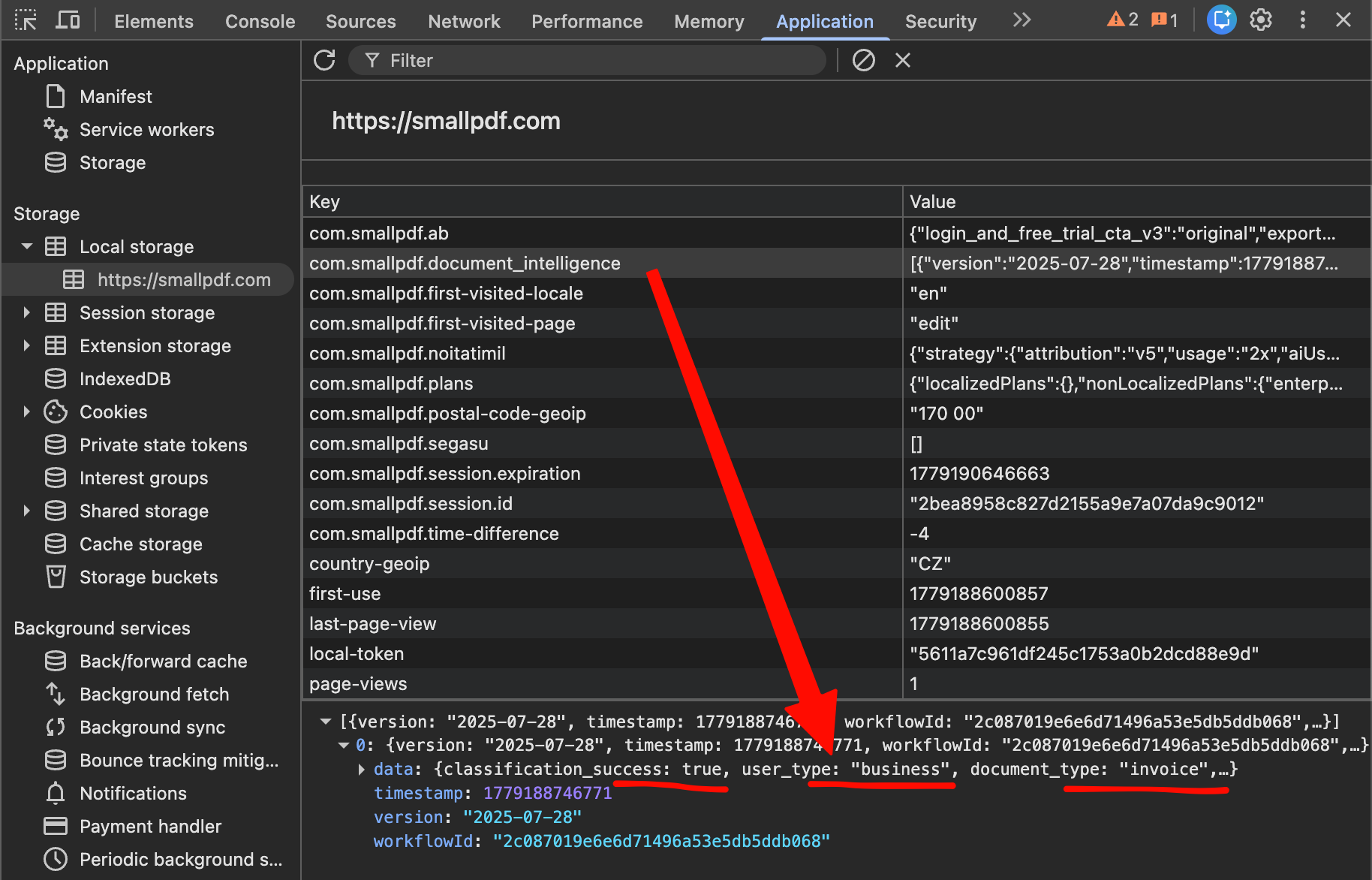
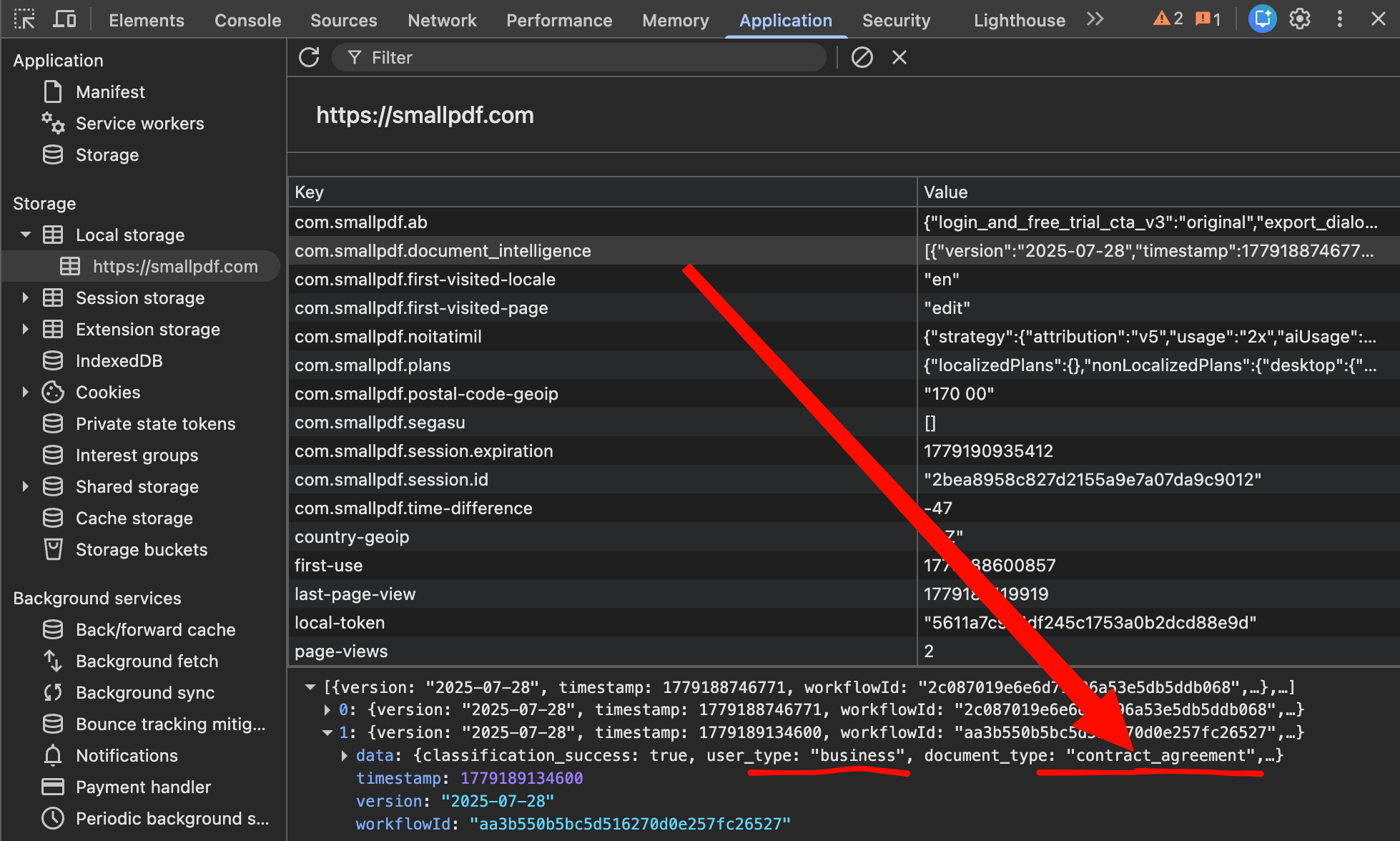
The policy and the observed behavior directly contradict each other. The policy says, in its own words, that AI decisions are never used to create automated profiles. The observation shows that an AI classifier examines the document contents and assigns a user_type field, which by definition is an automated profile produced by an AI decision about the user.
Every PDF’s Author, Creator, and Producer fields leave on every upload
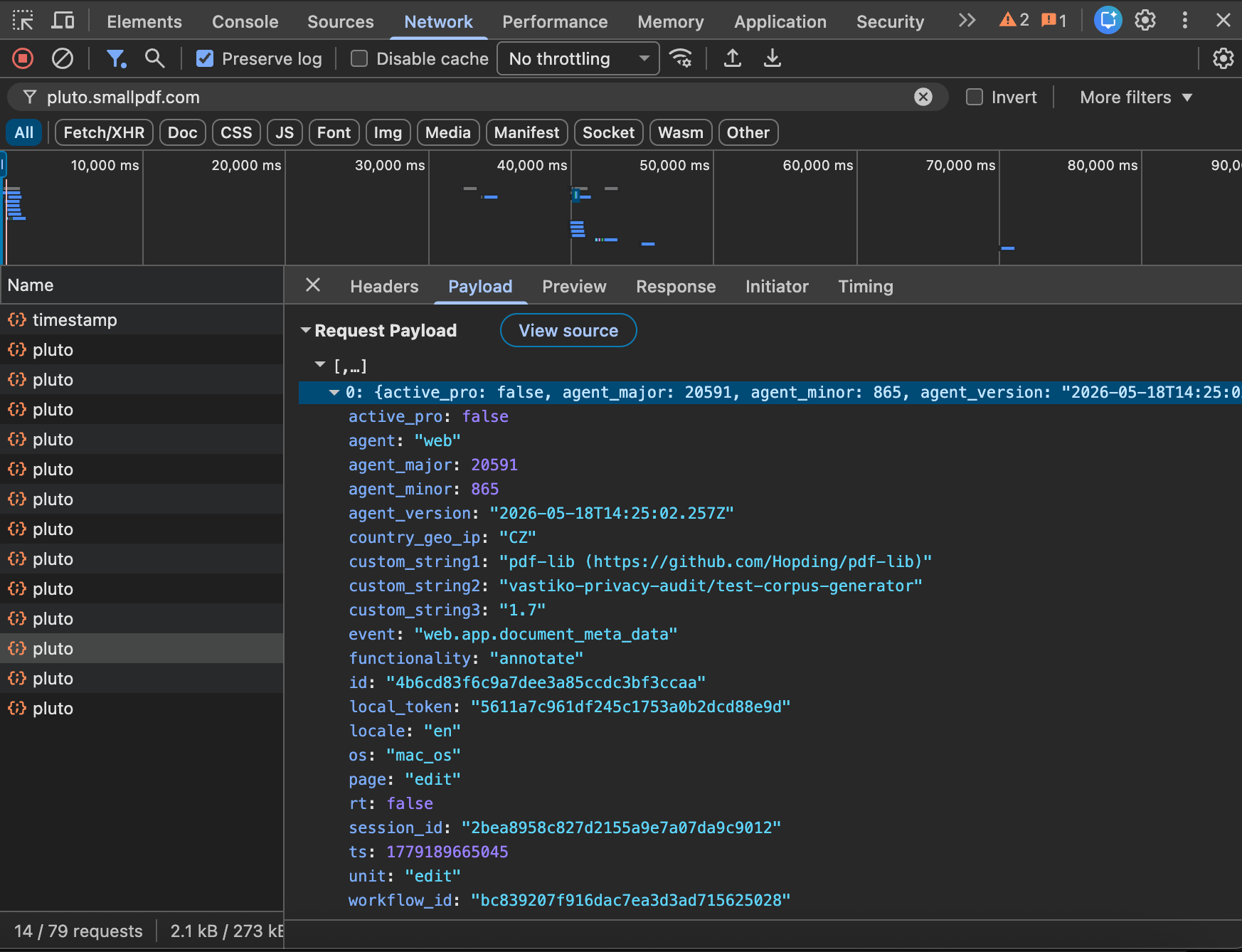
We captured every network request the page made and recorded the full event stream that SmallPDF ships to its own data-collection endpoint (pluto.smallpdf.com/v2/pluto). One session with a single document upload produces fourteen separate events — web.app.workflow_initiated, web.app.files_added, web.docint.processing_started, web.docint.processing_finished, and so on.
Two of them deserve a closer look: web.app.document_meta_data and web.app.document_meta_data_author. Both fire on every file upload. Their bodies, captured on the wire:
{
  "event": "web.app.document_meta_data",
  "custom_string1": "pdf-lib (https://github.com/Hopding/pdf-lib)",
  "custom_string2": "vastiko-privacy-audit/test-corpus-generator",
  "custom_string3": "1.7"
}
{
  "event": "web.app.document_meta_data_author",
  "custom_string1": "Vastiko Privacy Audit 2026"
}
SmallPDF reads the Creator, Producer, Author, and format-version fields of every PDF it receives, and ships them as separate telemetry events. In our test, those fields carry values from the pdf-lib library we used to generate the corpus. In a real user’s PDF authored in Microsoft Word, the Author field is filled in from the user’s Office account name — that is, from real personal data. Creator is filled in the same way: “Microsoft® Word for Microsoft 365”, “Adobe Acrobat 24.x”, “Pages 14.x”, “Quartz PDFContext” (if the PDF was saved through macOS Print to PDF), and so on. Those strings — all of them — leave the browser as SmallPDF telemetry on every upload.
SmallPDF’s policy (section 5, “User Files”) describes file metadata as “such as file size, file name, and file type”. Author, Creator, and Producer are not in that list.
SmallPDF knows your postal code, not just your country
One session leaves 17 keys in localStorage. The most specific is com.smallpdf.postal-code-geoip, which in our session held the value “170 00” — the postal code for Prague 7, the Bubenéč district. Not “country” and not “city”: a specific postal zone within a single city, derived from the visitor’s IP and persisted in the browser.
Beyond document_intelligence and the postal code, the list includes:
country-geoip: "CZ"— country.com.smallpdf.ab: {"login_and_free_trial_cta_v3": "variant", "export_dialog_v3": "variant"}— the user has been bucketed into A/B test variants with no explicit consent.local-token— a 32-character hash, also mirrored in the cookie_s.lt. A persistent user identifier across sessions.first-use— the timestamp of the visitor’s first session.
The editor does in fact render the PDF locally, through PDFTron’s WebViewer, a commercial engine compiled to WebAssembly (a real program running inside the browser, without a server). The service is not lying when it says the editor runs in the browser. But in parallel with the local rendering, the following chain runs:
GET files.smallpdf.com/v1/r2/upload-url/<hash>.pdf— fetch a pre-signed URL for upload.PUT smallpdf-production-files.<tenant>.r2.cloudflarestorage.com/<hash>.pdf?X-Amz-…— the file is uploaded to Cloudflare R2 (S3-compatible cloud object storage), via a 15-minute signed URL.POST api-gw…confirmDirectUpload?fileId=<hash>— confirmation that the file has been received.
Net effect: editing happens locally, and the file is uploaded to the cloud at the same time. Why the second branch is needed, if the first already handles the display task, is a question for SmallPDF. The possible answers span a wide range — from entirely legitimate (cross-device sync, restore-on-reload, server-side export to other formats) to debatable (user-profile enrichment, model training). We come back to this under “Why this data is collected”.
Sejda — an example of plain disclosure
Sejda BV is a Dutch company headquartered in Amsterdam. On sejda.com/pdf-editor, directly below the upload button, a short sentence reads: “Files stay private. Automatically deleted after 2 hours.” And, unusual for a commercial service, right next to it: “Rather not upload your files and work with them offline? Try Sejda Desktop. Same features as the online service, and the files never leave your computer.”
The service does not try to convince you that the file is somehow handled client-side. It says plainly that uploads happen, and offers an alternative.
In observation: a single POST www.sejda.com/api/files/upload — the file does in fact go to Sejda’s server. And from there it gets interesting: zero third-party trackers. No Google Analytics. No Google Tag Manager. No Google Ads. No Facebook or LinkedIn pixels. No IAB TCF vendors.
The only analytics Sejda loads is Plausible Analytics, hosted on its own subdomain a.sejda.com. Plausible is known in the industry for not using cookies and not tying events to an individual user — only aggregated page metrics.
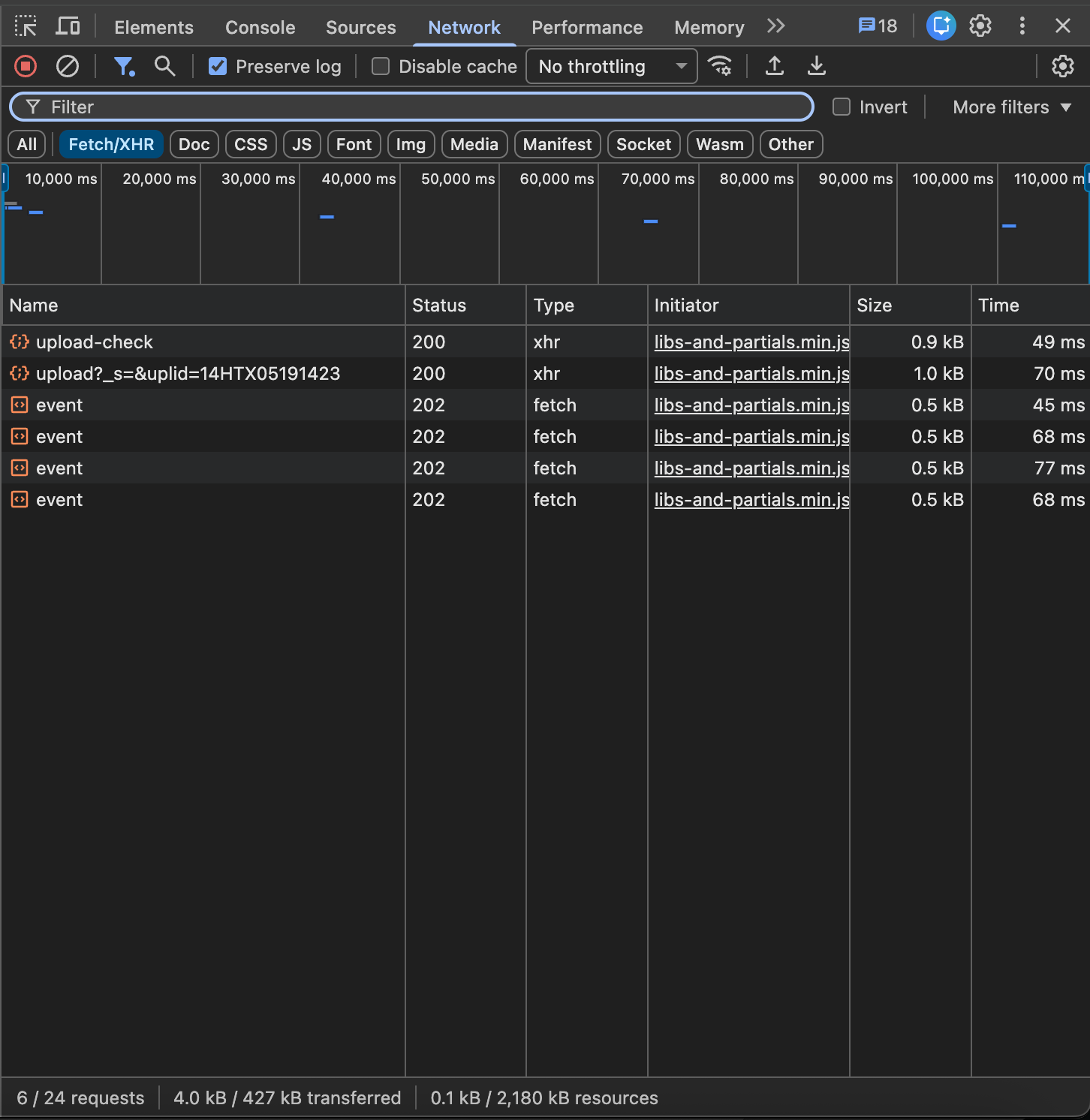
After a full session, localStorage contains three keys: thumbnail-preview size, terms-of-use acceptance timestamp, and last-used tool. There are three cookies, too: a session ID, a language, and a server-side counter. No persistent advertising identifiers, no fingerprinting, no consent-free A/B buckets.
For a free commercial tool reaching nearly 12 million visits per month, this is an unusual picture. Sejda monetizes through paid plans (Sejda Pro) and a Desktop version, not through advertising. The architectural logic is clean: the page does not need to be an ad surface — so the built-in ad-tech stack is not there.
PDFescape — banner says one thing, the page does another
PDFescape is a product of Avanquest Software (France, part of the Claranova group). By reach it is markedly smaller than the rest — about 0.43 million visits per month, an order of magnitude below iLovePDF or SmallPDF. By tracking intensity, however, it is the densest service we checked.
A single upload of one test PDF caused the browser to issue 128 network requests. For Vastiko, the same action produces 19. The volume alone is a signal.
On landing at pdfescape.com, a OneTrust modal titled “Manage my cookies” appears. Its text:
“We and our 4 partners store and access personal data, like browsing data or unique identifiers, on your device. … Use precise geolocation data. Actively scan device characteristics for identification. Store and/or access information on a device. Personalised advertising and content, advertising and content measurement, audience research and services development.” — OneTrust consent modal on pdfescape.com
The modal offers three options: “Accept All”, “Reject All”, and “Cookie Settings”. In our test we clicked none of them — we stayed in the default state, with no explicit consent given. This matters for GDPR Article 7: processing of personal data requires consent that is freely given, specific, informed, and unambiguous. Silence does not count.
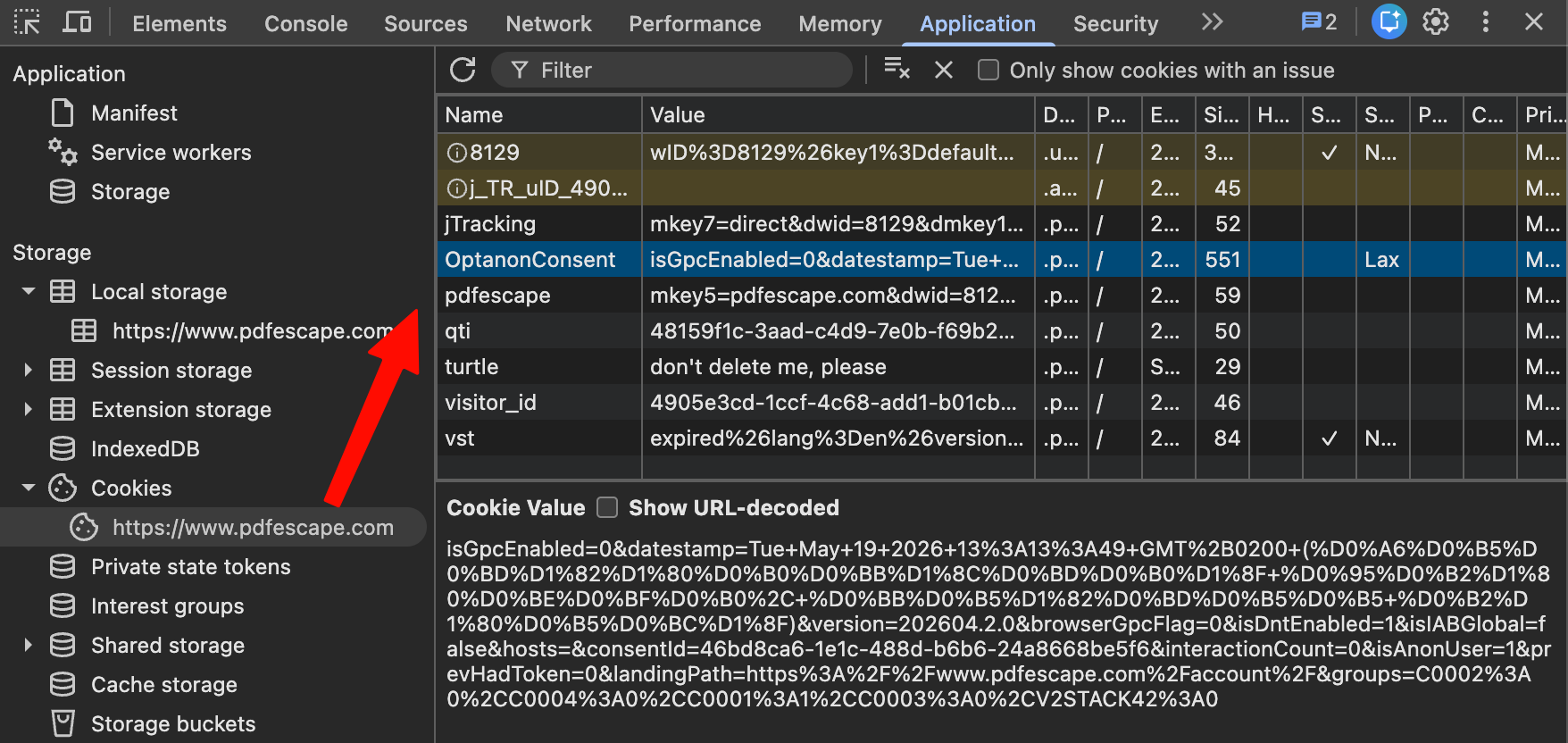
From the OneTrust cookie, we could read the actual consent state the page itself was working with:
OptanonConsent = {
  groups: {
    C0001: 1,       // Strictly necessary — accepted (mandatory)
    C0002: 0,       // Performance — DECLINED
    C0003: 0,       // Functional — DECLINED
    C0004: 0,       // Targeting/advertising — DECLINED
    V2STACK42: 0    // Advertising data sharing — DECLINED
  }
}
The user did not consent to advertising cookies (C0004: 0) and did not consent to advertising data sharing (V2STACK42: 0).
Despite that, the following cookies — all clearly part of the advertising ecosystem — were set anyway:
BT_tpc,BT_AA_DETECTION,BT_device— BTLoader, a programmatic ad platform.id5id_privacy,id5id_privacy_exp— ID5, cross-site identity sync (ID5 is a system that “stitches” the same person across different sites for targeting purposes).adagio,adagioScript— Adagio, an ad exchange._sharedID,_sharedID_cst— Prebid Shared ID, an identifier for cross-publisher advertising.
All four — Adagio, BTLoader, ID5, and Prebid Shared ID — exist precisely for the purposes covered by the C0004 (targeting) and V2STACK42 (ad sharing) groups: the groups the user declined. The cookies were present regardless.
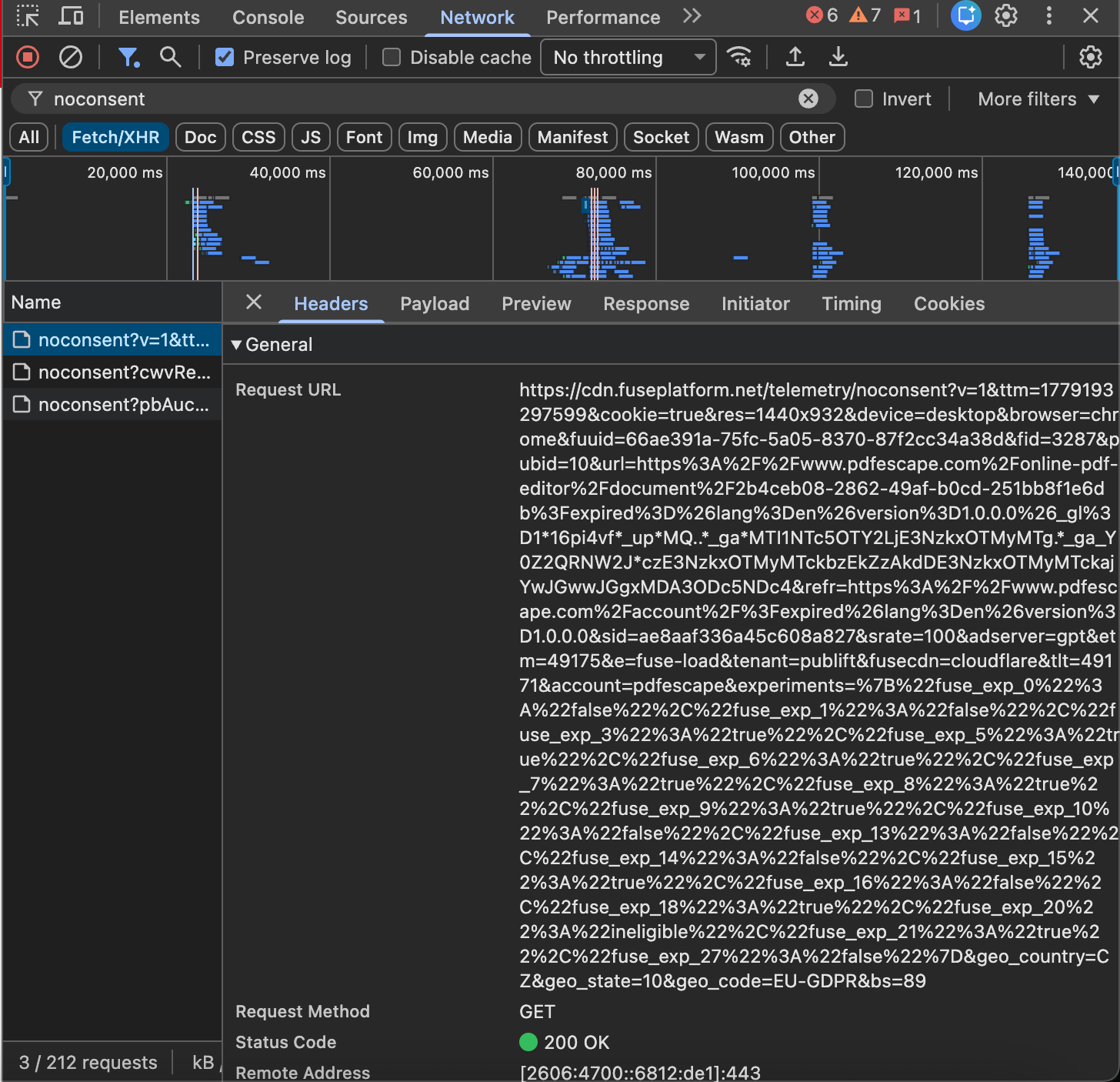
One request in the network log is particularly telling: cdn.fuseplatform.net/telemetry/noconsent?v=1&…&geo_code=EU-GDPR&…. The endpoint is literally named “noconsent” — and it carries the parameter geo_code=EU-GDPR, meaning the service explicitly knows it is sending no-consent telemetry from a GDPR jurisdiction. That is hard to read as accidental.
The file itself is not uploaded to PDFescape’s own servers. It goes to Microsoft Azure Blob Storage, via a 15-minute signed URL. The file is assigned a unique identifier, and the editor URL becomes /online-pdf-editor/document/<uuid>. A separate document session is created server-side.
What runs across those 128 requests:
- Loading of Google Analytics, Google Tag Manager, and Google Ads (proxied via
track.pdfescape.com). - Prebid header bidding initiation — an open programmatic ad protocol. The bidder queue includes around twenty ad networks: AppNexus / Xandr, Rubicon, OneTag, Criteo, BTLoader, Amazon Publisher Services, PubMatic, Sonobi, Teads, Vidazoo, 33across, GumGum, IX, Adagio, AMX, Insticator, NoBid, OMS, SmartAdServer, Trade Desk. Every page load triggers real-time bidding among them.
- ID5 and Shared ID synchronize identity across several third-party domains (
id5-sync.com,lb.eu-1-id5-sync.com, and others). - Elastic APM real-user monitoring (on GCP), Lulusoft jtracking-gate, Upclick (an Avanquest click-tracking partner), and Avanquest QTI — four additional in-house telemetry systems.
An in-house proxy sits in front of Google Analytics
Two settings in PDFescape’s Google Tag Manager configuration (container GTM-W2GXRR4, publicly accessible) stand out. The first: every GA4 tag carries the parameter server_container_url: https://cloud.pdfescape.com. Google Analytics events therefore do not go to Google directly: they first pass through PDFescape’s own server, and only from there to Google. What that server does to the data in transit — filtering, enriching, duplicating into other systems — cannot be observed from outside. The picture we describe above is the picture visible to the browser. What happens between PDFescape’s server and Google is, for a client-side audit, a black box.
Your session follows you across 13 sister PDF sites — undisclosed
The second setting: the Google Click ID Linker lists 13 domains — SodaPDF (com and de), PDFsam, PDFmerge, PDFArchitect, PDFSuite, PDF-Format, PDF-Suite, Docudesk, plus corporate services Lulu Software, Upclick, U-Bill, Zendesk. All belong to the Avanquest / Claranova group. The configuration means: if a user lands first on PDFescape and then navigates to SodaPDF (a paid product) or PDFsam, Google Analytics sees the same visitor continuing the same session. PDFescape’s privacy policy does not disclose this.
In the site footer there is a link, “Do Not Sell or Share My Personal Information” (CCPA). Its presence confirms that the company operates under the California Consumer Privacy Act and offers a formal opt-out.
Taken together, this is the textbook shape of a “dark pattern” in consent management: the user is shown a choice, the response is captured in a configuration cookie — and the page’s actual behavior does not reflect it. The jurisdiction is the EU (Czechia), so GDPR applies. Whether to read the observation against Article 7 (consent requirements) and Article 6 (legal basis for processing) of the GDPR is a question of legal qualification that is not ours to answer. We record the discrepancy; what to do with it is for the reader to decide.
Vastiko — our baseline and conflict of interest
Vastiko is the service publishing this audit. The author is a Vastiko developer. We deliberately left this section for last — putting our own service at the top of any ranking would look like covert promotion. Its placement in the top tier here is a consequence of applying the same measurement to it as to the other four. The conflict of interest is addressed in the closing paragraphs below.
Vastiko’s privacy policy states: “0 BYTES of your file content are transmitted to our servers.” And, in the same policy: “You can verify this yourself: open your browser’s DevTools, switch to the Network tab, then drop a file. No request is made to upload it.”
We applied the same method to Vastiko as to the other four services. After uploading a test PDF, exactly four new requests appeared in the browser:
GET vastiko.com/assets/pdf.worker-*.mjs— the PDF.js rendering worker, from Vastiko’s own domain.GET fonts.gstatic.com/.../materialsymbols*.woff2— the Material Symbols icon font from Google Fonts.GET vastiko.com/fonts/Inter-Regular.ttf— the UI font from Vastiko’s own domain.POST region1.google-analytics.com/g/collect?...&en=file_loaded&epn.pages=1&epn.size_kb=0— a single Google Analytics event with metadata at the level of “edit-pdf tool, 1 page, size rounded to 0 KB”. The file itself is not in this request.
Not one POST or PUT request with a body the size of the test PDF. The claim that the file does not leave the browser is corroborated by direct observation of the network.
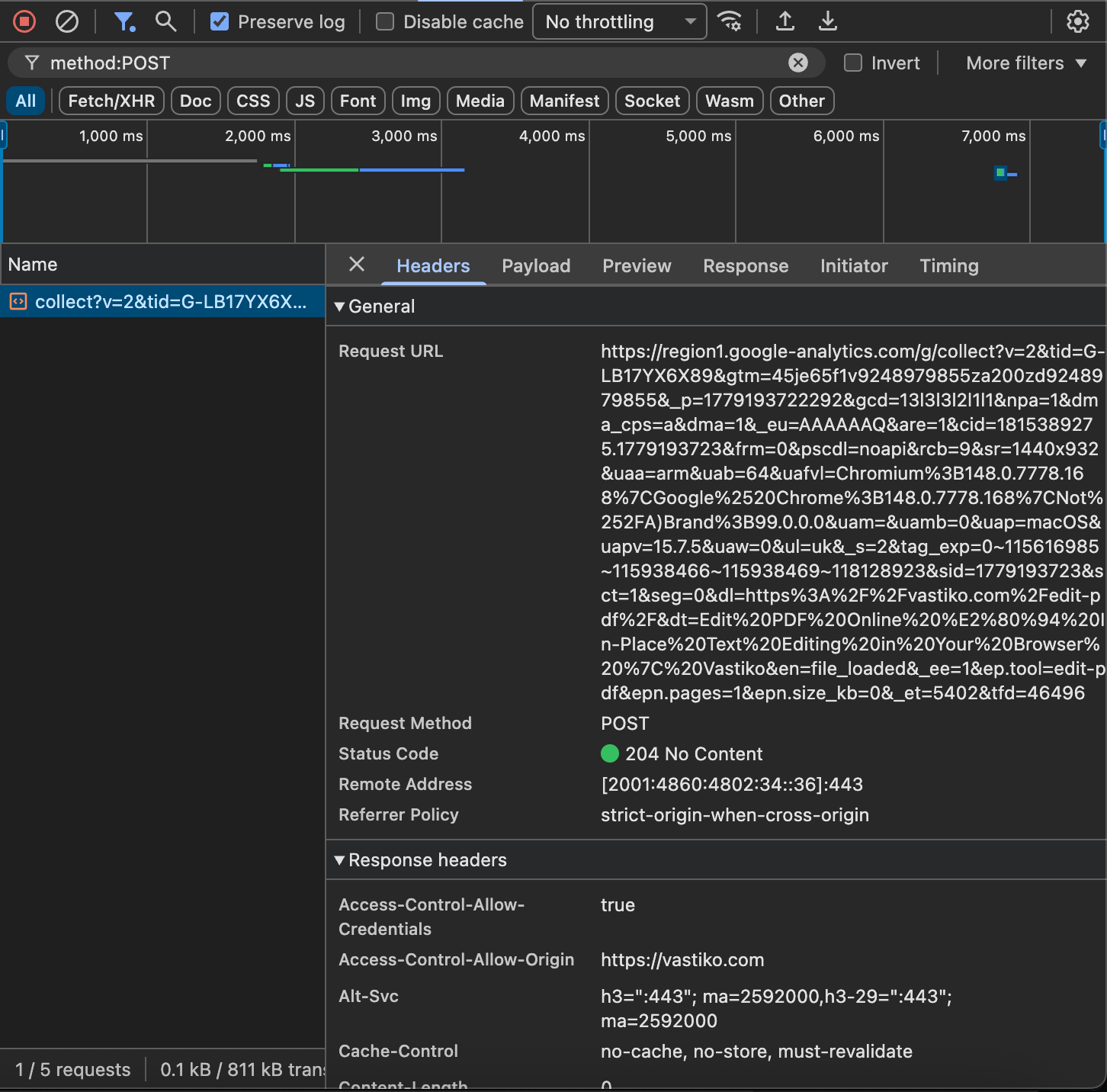
If Vastiko ever breaks its own statement, anyone can spot it the same way — thirty seconds in DevTools.
Why this data is collected
For each practice described above we can demonstrate that the collection is happening. We cannot demonstrate exactly why — that decision is made inside each service, and is not visible from the browser.
For each material finding we offer a three-tier reading of possible reasons: a “least-charged” interpretation (a legitimate product purpose), a “middle” one (industry-standard but ethically debatable), and a “most-charged” one (worst case). Which is true in reality, we do not claim — that is precisely the question we invite each service to answer under the right-of-reply procedure.
One example. SmallPDF classifies your document using an AI model. Possible reasons:
- Least-charged: interface tuning by document type (“show a Sign.com button for users uploading an NDA”), sales segmentation (“business users yield more revenue — push the Pro upsell harder”), A/B personalization.
- Middle: seed data for custom audiences in Google and Facebook (an audience of “users editing business documents” is useful for retargeting); lead scoring in HubSpot.
- Most-charged: resale of segments into data-broker systems (LiveRamp, Acxiom, Oracle Data Cloud); use as seed data for lookalike audiences; transmission to ad systems where the segment “business user recently working with invoices” has obvious market value.
What we can state publicly:
- ✓ “SmallPDF automatically classifies the contents of an uploaded document and assigns the user a profile of type
business.” This is an observable fact. - ✓ “SmallPDF’s policy says, verbatim, that AI decisions are not used to evaluate users or create automated profiles.” This is a direct quotation.
- ✗ “SmallPDF sells your data to third parties.” This cannot be established from a client-side audit — and we do not make the claim.
Some questions are, by definition, invisible from the browser: how the collected data is used downstream, whether it is shared, on what legal grounds. Those questions can be answered either by the services themselves — under the right-of-reply procedure described below — or by tools with access to internal systems. Our part of the work — recording what is publicly observable — is done.
What remains unanswered
Six concrete questions our method cannot answer, but worth keeping in mind — both for the reader and for anyone interested in continuing the work outside the scope of a client-side audit:
- What happens to your file after upload? Sejda says files are deleted after two hours. iLovePDF and SmallPDF are vaguer on the subject. PDFescape says next to nothing. Whether any of these claims hold cannot be verified from outside.
- Where does the output of SmallPDF’s AI classifier go? The
document_intelligenceworkflow producesdocument_typeanduser_typelabels. Whether they flow on into Google Ads custom audiences, CRM lead scoring, model training, or simply sit in a debug dashboard — not visible from the browser. - Do iLovePDF and SmallPDF share data with each other? Both companies belong to Bending Spoons. Profile consolidation would be both commercially sensible and legally permissible. Whether it happens in practice — not visible from the browser.
- Is PDFescape’s discrepancy between banner and behavior deliberate? We can show that advertising cookies are set despite the user’s refusal. We cannot show whether PDFescape is aware and is choosing not to fix it.
- What does iLovePDF actually send in the bid requests reaching its 140 TCF vendors? The vendor list is fetched on every page. The exact contents of each bid request depend on header-bidding configuration we did not exhaustively capture.
- How do these services behave for authenticated paid users? Our audit covers the anonymous flow only. Paid users likely see fewer third-party pixels — but receive deeper first-party tracking through their account.
These questions remain open because answering them requires access to the services’ internal systems or to authenticated paid flows. That falls outside what can be observed in the browser — and outside the question we set ourselves in this piece.
Right of reply
Two weeks before publication, we sent this text to the privacy contact addresses of every named service ([email protected], [email protected], [email protected], [email protected]), with a 14-day window to respond. Responses — and the absence of them — will be reproduced verbatim in the published version.
Conflict of interest: the author is Oleksandr Utkin, a developer at Vastiko, one of the services in scope. Vastiko’s “0 bytes” claim is verified by the same method as every other claim in this piece.
How to verify it yourself
Every claim above can be checked in about thirty seconds. Open the service in Chrome in incognito mode, launch DevTools (F12), switch to the Network tab, drop your PDF. If the log shows a POST or PUT carrying a body the size of your file, the file went to the server. Application → Cookies shows what was written to your device. Compare with what we report above.
Bottom line
If there is no time for the whole article — five takeaways, one per service:
- iLovePDF (179M visits/month). The cookie banner’s phrase “not your files” gives the impression that the file is not uploaded — it is. Every page load triggers an ad auction with 140+ partners; analytics fire before the user has responded to the consent banner. A JWT token issued in 2018 has been public for eight years.
- SmallPDF (56M). The main finding of this piece. An AI classifier quietly determines the document type (
document_type: "invoice","contract_agreement"…) and, at the same time, assigns the user a profile fielduser_type: "business". This directly contradicts the service’s own policy, which states verbatim: “AI decisions are never used to evaluate users or create automated profiles.” PDF metadata (Author, Creator, Producer) is shipped to telemetry as separate events. - Sejda (12M). The only large service with zero third-party trackers. Plausible analytics only, no cookies. Monetized by paid subscription and a Desktop version, not by advertising.
- PDFescape (0.4M). The densest tracker of the lot — 128 requests on a single upload. Advertising cookies are set despite the user’s refusal in OneTrust. A server-side proxy hides what actually reaches Google. Cross-domain tracking links the visitor to 13 sister PDF services in the same corporate group.
- Vastiko (new; conflict of interest disclosed). The file never leaves the browser; the “0 bytes” claim is corroborated by the network log.
In one sentence: the monetization model decides what a service does with your file. A service that earns from ads classifies what you upload, routes the metadata through programmatic auctions, and ships it to telemetry servers. A service that doesn’t, doesn’t. The trust stamps, the consent banners, the policy paragraphs that promise “never used to evaluate users” — every one of them is downstream of that single business-model fact.
Questions and comments: [email protected]